
Sometimes when sending e-mail messages, we are left wondering if the recipient really did receive the e-mail message, to help us on this, we can always request from our recipient to return a receipt requesting a Read Receipt from the Outlook client, to configure, all we need to do is follow these simple steps.
Step 1:
Click on File

Step 2:
In the left pane of options that appear, click on Options

Once the Outlook Options window appears, click on Mail and scroll down to the Send Messages section, click on Read Receipt confirming the recipient viewed the message.
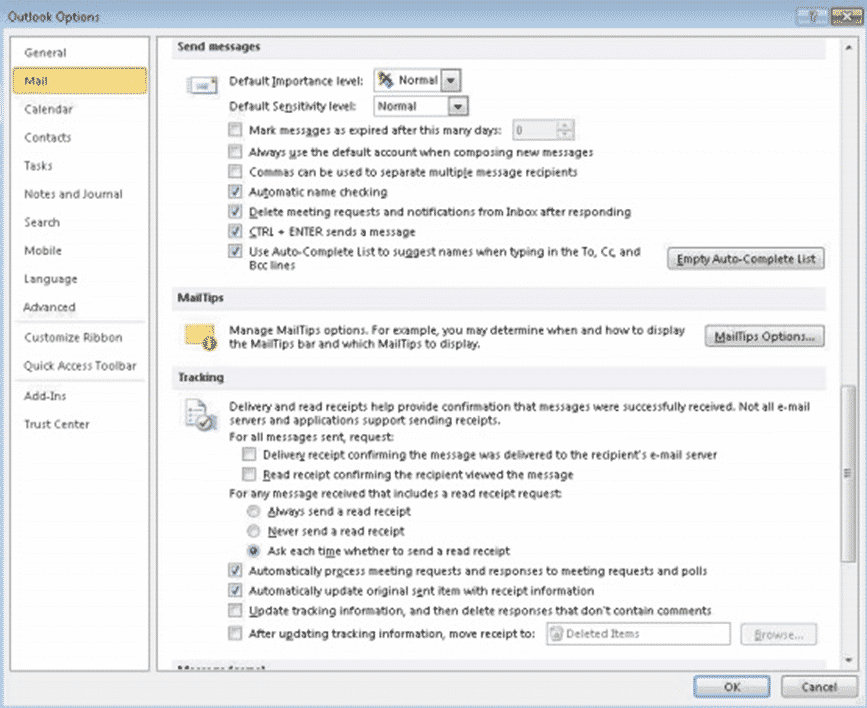
Now you should start receiving read receipts when the e-mail you sent is opened and read.
0 Comments